AI Image Translator
Precisely detect and translate on-image text — turn product detail images and A+ content into any TikTok market language in one click, ready to list as-is.
What is "Image Translation"?
Image Translation is Clipcat's cross-border image translation tool. Upload one image and it precisely detects the on-image text, then translates product detail pages, A+ content and other cross-border assets into any TikTok market language in one click. The translated image keeps the original layout, colors, and product placement, and you can set an output size and decide whether on-product text (like a product name) gets translated too. No re-laying-out, no redrawing — in seconds you get a multi-language product image ready to swap in and list.
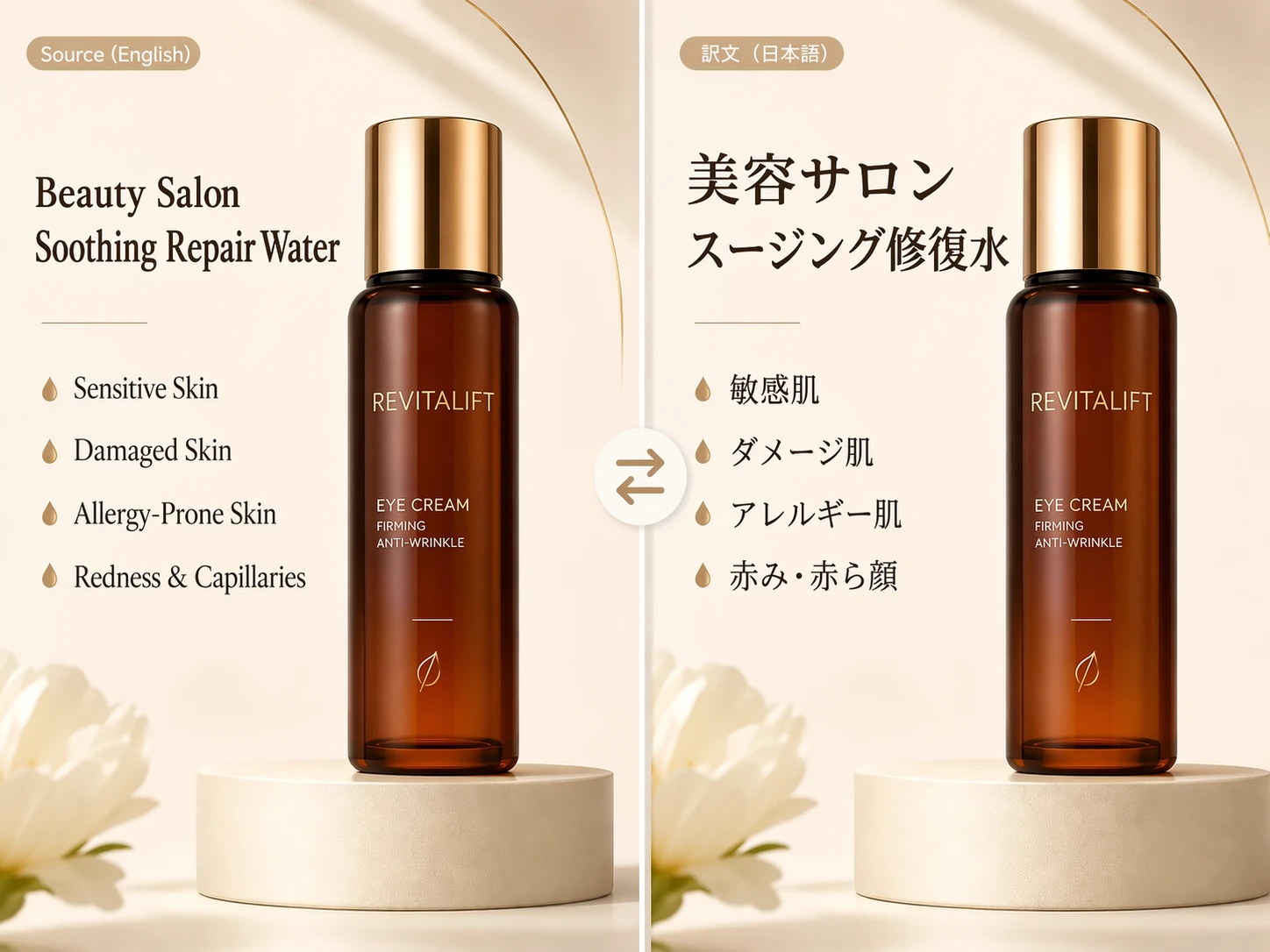
Translate a product image in 3 steps
No design or photo-editing skills needed — upload an image, pick a target language, and get a multi-language product image with the original layout intact.
Provide a reference image
Pick from your asset library or upload locally the image you want translated, such as a product detail page or A+ content image.
Choose language and rules
Enter the target language (any TikTok market is supported), set an output size if needed, and decide whether on-product text gets translated too.
Get a multi-language image
The system detects the original text and fills the translation back into the original layout, outputting a translated image with the same colors and product placement, plus a text comparison table, ready to swap in and list.
A closer look at Image Translation
From precise detection to layout preservation to full-language coverage, one translation gets you a listing-ready cross-border product image.
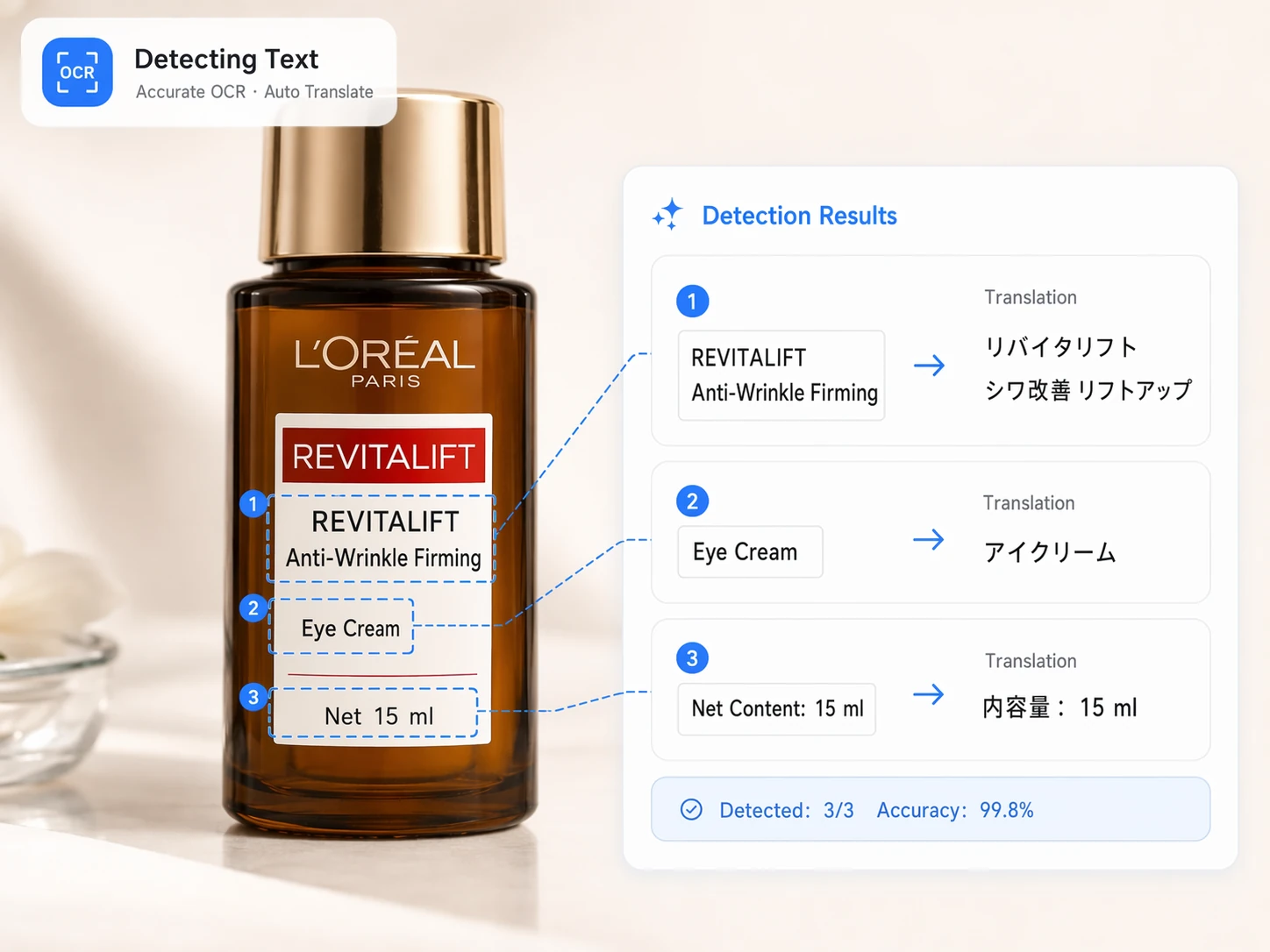
Precisely detects every piece of text in the image
Automatically detects titles, USPs, specs, net weight and every other type of text region, catching even small print and multi-line layouts accurately. The more accurate the detection, the more faithful the translation — cutting down on missed or misplaced text and setting up clean layout restoration.
Learn about the detection engineKeeps the original layout and colors after translation
Fills the translated text back into its original position, size and style, preserving the image's layout structure, colors and product placement so the translated image looks and feels just like the original. No re-laying-out or redrawing needed — what you get is ready to swap in and list, keeping your product page style consistent.
See a before/after comparison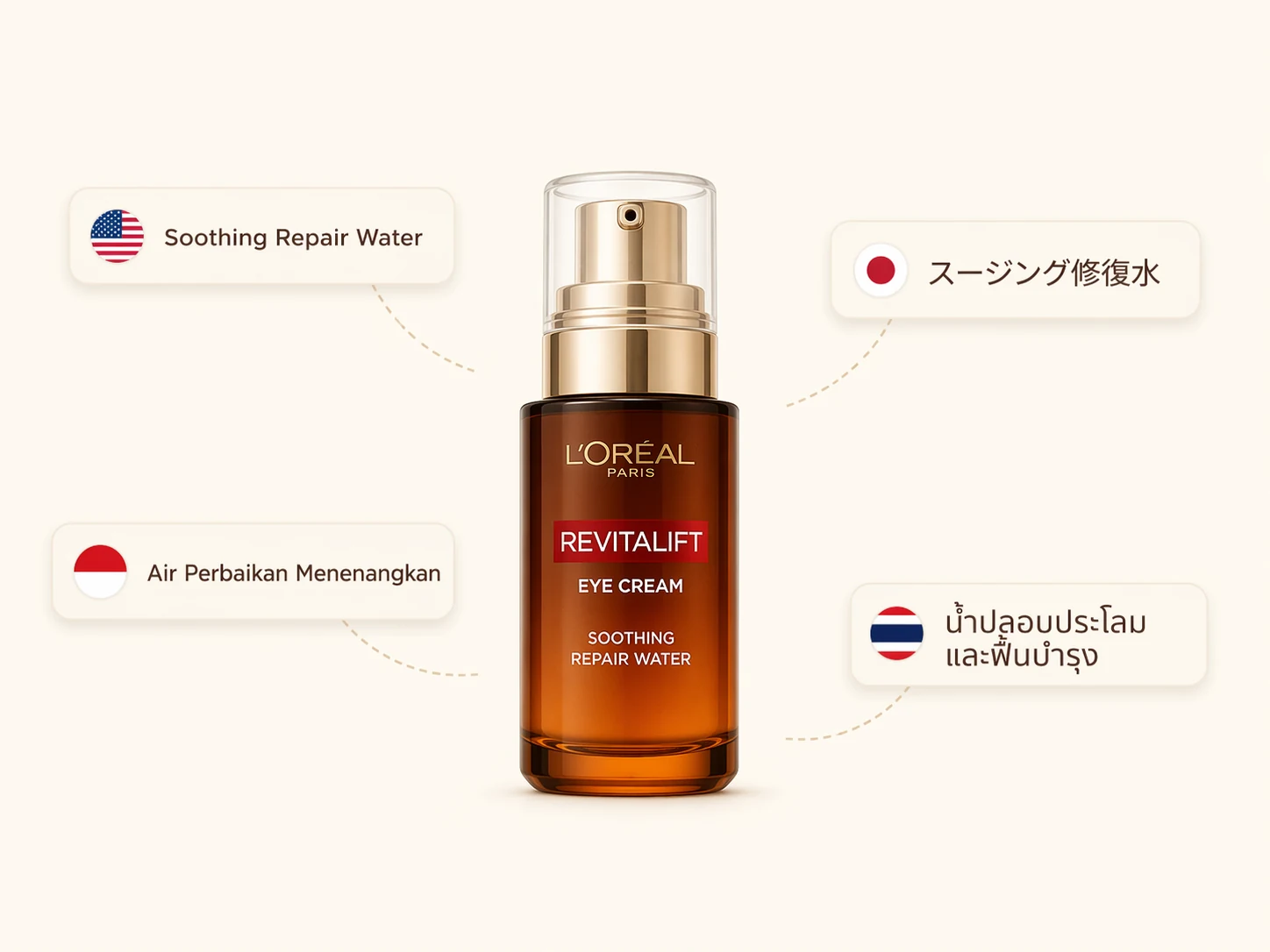
Covers every TikTok market language
Supports translation into English, Japanese, Indonesian, Thai, Vietnamese, French and every other TikTok market language, quickly producing multi-language versions from one original image. You can also control whether on-product text like the product name gets translated, and output at 9:16, 16:9, 1:1 and other sizes to flexibly fit different markets and placements.
See supported languagesWhy use it for image translation
Compress the old workflow of picking out text line by line, translating, re-laying-out and resizing into one translation that takes seconds.
Accurate detection, faithful translation
Precisely detects every piece of text in the image and translates it in an e-commerce context, so titles, USPs and specs all read naturally with fewer mistranslations.
Layout preserved, ready to use
Translated text is filled back into its original position, preserving layout, colors and product placement, so the translated image looks like the original and can be swapped in without re-laying-out.
Multi-language, one click to go global
Supports every TikTok market language, lets you control whether on-product text gets translated and set an output size, quickly covering multiple markets from one image.
Who should use "Image Translation"?
From solo sellers to brand teams, anyone who needs to quickly translate product images into multiple languages while preserving layout for listing can save a huge amount of time with this tool.
Cross-border sellers / operators
Translate a product detail page into your target market's language in one click, preserving the original layout for listing and cutting multi-language image prep for new launches from days to minutes.
Marketing / content teams
Quickly localize ad creative and A+ content into multi-language versions with a unified visual style across markets, for faster content output and steadier conversion.
Visual designers
Hand off repetitive text extraction, translation and re-laying-out to the model instead of editing copy image by image, freeing yourself to focus on creative direction and brand control.
Brand / merchant teams
Batch-produce consistently styled multi-language product images across multiple SKUs, keeping visual standards unified and getting your global-launch image assets ready in one pass.
Localization / translation teams
Detection, translation, and layout restoration happen in one step, so you're not switching between screenshotting, translating and re-laying-out — batch output of multi-language images doubles in efficiency.
MCN / agency operators
Batch-translate product images for multiple clients and stores, delivering a full compliant multi-language set in minutes and cutting the cost and turnaround of outsourced translation.
Why they can't do without it: real results from real users
Hear from the sellers, designers and teams who've transformed their multi-language image workflow with it — real time saved and smoother global launches.

Launching into a new market used to mean re-screenshotting, translating, and re-laying-out the detail page — a whole day gone on one set of images. Now I upload the original image, pick a language, and get a translated image in seconds with the exact same layout, ready to list.

What I love most is it keeps my original layout and colors after translating — I'm not repositioning text character by character anymore. Handing off the repetitive text extraction and translation frees my time for creative work, and my output has doubled.
One original image can produce English, Japanese and Indonesian versions at the same time, which is great for running different markets. The text comparison table lets me check terminology too, so translation quality is reassuring and reuse across product pages and ads feels seamless.

We run a dozen-plus stores going global, and detail-page translation used to be outsourced — expensive and slow. Now batch translation is done in one pass, and both our turnaround and professionalism have gone up a level.

As a brand, visual consistency across markets matters a lot. It keeps the layout and colors after translation, so every language version stays consistent, and our global-launch image assets are ready in one pass — it's both a relief and a professional touch.

Zero design background — I upload an image, pick a language, and get a translated image with the sizing and layout intact, ready to swap in and list right away. It's saved me a huge amount on hiring translators and designers.
About Image Translation
It supports product detail pages, A+ content, hero images, USP infographics and other e-commerce image types, precisely detecting and translating the on-image text while preserving the original layout, colors and product placement.
It supports every TikTok market language, such as English, Japanese, Indonesian, Thai, Vietnamese and French — just enter the target language and translate in one click.
No. After detecting the original text, the system fills the translation back into its original position and style, preserving layout, colors and product placement so the translated image can be swapped in and listed directly.
Yes. Use "Translate on-product text" to control it: enter "yes" to translate on-product text like the product name too, or leave it blank to keep the product's original text and only translate the rest.
Yes. Enter a target ratio like 9:16, 16:9 or 1:1 in "Image size" to output at that size; leave it blank to keep the original image's size.
Upload an image, translate it into a multi-language product image in one click
Precise detection, layout preserved — get a listing-ready translated image in seconds.