GUIDE · SEEDANCE VIDEO PROMPTS
Seedance Video Prompt Template: A Practical Guide from Text to Controllable Video
A Seedance prompt works best as a compact production brief. Define the subject, action, setting, camera, timeline, audio, and constraints so the generated result is easier to review and iterate. This guide provides reusable templates and a Clipcat workflow.
The direct answer: what belongs in a Seedance prompt?
Answer six questions: who or what is visible, where it is, what it does, how the camera captures it, what happens in what order, and what must not appear. Add dialogue, voiceover, ambience, and music instructions when sound matters.
“A person walking in a city, cinematic” gives direction but leaves the model guessing. A useful version specifies clothing, weather, movement, framing, timing, light, and exclusions. It becomes a reviewable shot plan rather than a pile of adjectives.
Keep the first draft simple. Verify subject identity and action before adding complex camera moves, dialogue, or multiple transitions.
The eight fields of a reusable Seedance prompt
1. Subject and appearance
Describe the person, product, animal, or environment with observable traits: color, material, clothing, quantity, and proportions.
2. Action and outcome
Use verbs and sequence. Replace “energetic” with “turns quickly, lifts the product, pauses, and looks at camera.”
3. Setting and time
State location, season, time of day, weather, and light direction so continuity has a reference.
4. Camera and composition
Choose shot size, camera height, movement, and focus. Avoid conflicting moves in one shot.
5. Timeline and pacing
Split the duration into short blocks. Give each block one main action and define when a transition happens.
6. Style and lighting
Use observable references such as soft studio light, natural documentary light, or muted film color instead of generic superlatives.
7. Audio and text
Separate dialogue, narration, ambience, music mood, and subtitle language. Add long captions in post-production when exact text matters.
8. Constraints and negative requirements
Specify aspect ratio, duration, continuity, objects to exclude, details that must not deform, and product claims that must not be invented.
Universal Seedance video prompt template
Replace the brackets with information you can verify. It works for product demos, tutorials, lifestyle clips, and short social videos.
If the result is unstable, reduce simultaneous actions, shorten the timeline, and place subject and continuity constraints near the top. More adjectives rarely fix an unclear action.
Three practical scene templates
Product demonstration
“Create a 10-second 9:16 product demo: a matte black bottle on a light wood table in a naturally lit kitchen. 0-3s medium close shot; 3-7s slow push toward the cap as a hand opens it; 7-10s return to the centered product. Realistic advertising light, consistent label and proportions, no invented claims or brand text.”
Step-by-step tutorial
“Create a 15-second overhead tutorial with one sheet of white paper and a blue marker. Show materials for 0-3s, fold in three clear steps from 3-10s with a half-second pause per step, then show the result. Stable camera, even light, no extra tools or skipped actions.”
Lifestyle scene
“Create a 12-second lifestyle clip: an adult in a beige sweater waters plants on a balcony at morning. Start on water droplets, pan to the side profile, then return to the plant. Natural ambience and soft warm light; maintain clothing and plant positions; no text or watermark.”
Use Clipcat to organize and iterate Seedance prompts
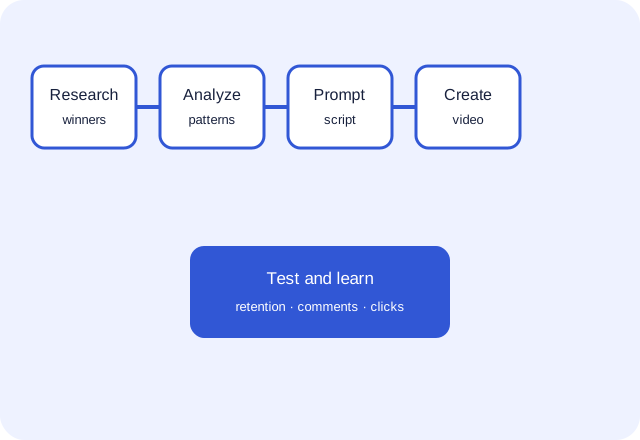
Clipcat helps turn a prompt into a reviewable video draft; it does not replace product research or factual review. Start with the AI prompt generator to structure subject, action, timeline, and constraints, then check the Seedance model page for the current access path and available options.
Have a reference clip? Use video to prompt to describe its shot structure, or use collect viral videos to build a public sample set. Study mechanisms, then replace the source’s subjects, assets, wording, and claims with your own.
A practical iteration order
- Validate subject appearance, setting, and basic action.
- Add camera movement and timeline.
- Add audio, caption space, and CTA.
- Check facts, rights, subtitles, and aspect ratio before export.
Pre-publish checklist
- Do subject count, color, material, and proportions match the input?
- Does every product claim have factual or visual support?
- Did you remove invented effects, reviews, prices, sales, and certifications?
- Are source music, faces, trademarks, and footage used with permission?
- Are dialogue, subtitles, and CTA readable on mobile?
- Did you record the prompt, version differences, and test feedback?
FAQ
How long should a Seedance prompt be?
There is no fixed length. Include the fields needed to make subject, action, time, camera, audio, and constraints unambiguous.
Why do subjects deform or skip actions?
Usually the subject is underspecified, too many actions share one time block, or camera moves conflict. Simplify first, then add complexity.
Can I copy a Seedance prompt from the web?
Learn its field structure, but rewrite the subject, assets, wording, and claims. Do not reuse distinctive protected material without permission.
Does Clipcat guarantee a viral result?
No. Clipcat and Seedance can improve production efficiency, while performance depends on content, audience, distribution, and testing.
Write the brief before you generate
A strong Seedance prompt is a checkable production brief. Fill it with real information, create a small batch in Clipcat, and iterate from evidence.
Organize a Seedance prompt in Clipcat