On TikTok Shop, the hard part was never the shooting — it's not knowing what will actually go viral. Most sellers scroll for hours looking for inspiration, copy one at random, and get no views. But a winner is never luck; it's a reusable structure: the hook in the first 3 seconds, the pacing of the cuts, the moment the selling point lands, how the lines build. What you really need is to take that proven, market-validated structure and clone it into your own product's same-style video. This guide shows you how to do exactly that with Clipcat Viral Video Cloning — your first TikTok same-style shopping video in minutes.
Quick answer
Open Viral Video Cloning → pick a reference video (paste a TikTok/Douyin link, or choose from the viral community, your asset library, or a local file) → upload your full product photo and angle shots → choose a video model → hit Generate. In minutes you get an original same-style video with your own product and character: it keeps the original's hook, pacing and selling-point structure, but the visuals, voiceover and product are all yours. Download the MP4 and post it. No script, no editing, no filming.
Why clone instead of starting from scratch
Inventing ideas from zero means gambling on every single video. But the vast majority of winners follow reusable structural patterns — patterns already validated by real views and conversions. Instead of guessing what will pop, clone a structure that's already earned traction and swap in your own product. Lower cost of trial and error, faster output, better odds. Here's a direct comparison of copying, generating from scratch, and cloning:
| Dimension | Copying / generic AI generation | Clipcat Viral Video Cloning |
|---|---|---|
| Content source | Swap a product over the original, or generate randomly from a prompt | Clones a proven, validated winning structure |
| Understands why it went viral | No — just copies visuals or rolls the dice | Breaks down the hook, pacing, shot order and selling points |
| Original output | Template-y and repetitive; copies get flagged as duplicate | Your product and character — an original same-style video |
| Character consistency | A different person every generation | Lock one on-camera character across a series |
| Learning curve | Write your own script, keep tuning prompts | Pick a reference + upload product photos — zero editing |
To see what's already working in your niche before you clone, start with collect viral videos to pull winners by keyword, then use Video Analysis to break down a winner's hook and selling-point logic — then bring your chosen clip into Viral Video Cloning.
Four reference sources — clone any video you want
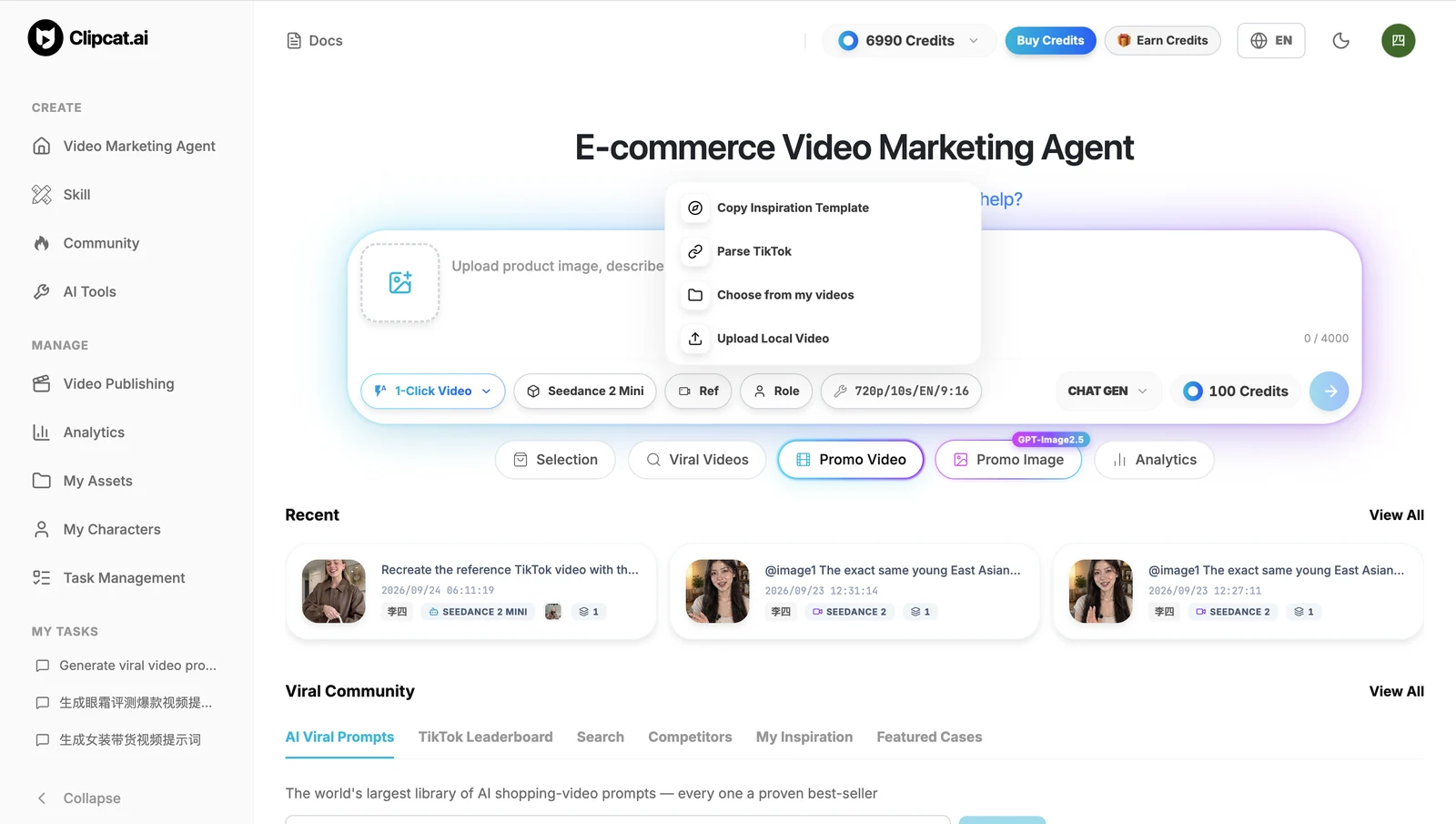
In Viral Video Cloning, click “Ref Video” and pick any one of four sources as the video to clone:
- Parse TikTok / Douyin link: paste a viral video link from the platform and clone its structure directly — the most common route.
- Copy inspiration template: pick a ready-made reference from the conversion-proven viral community templates, skipping the hunt for source material.
- Select from library: pick a clip straight from videos you've already uploaded to your asset library.
- Upload local video: upload any local video file as your reference.
All four give the same result — pick one, add your product photos, and start making your own version.
Make your own in 3 steps
The whole flow is three steps — no script, no editing.
1Pick a viral reference
Open Viral Video Cloning, click Ref Video, and pick a proven reference from one of the four sources above: paste a TikTok/Douyin link, choose a viral community template, select from your library, or upload a local file. Once selected, the system parses that video's structure automatically.
2Upload product photos and pick a model
Upload your full product photo and multiple angle shots, optionally lock an on-camera character and target language, then choose a video model (Seedance 2.5 / Seedance 2.0 / Wan 3.0 / Grok 1.5 / Veo 3.1, etc.). The more complete your photos and the more angles you give, the better the model understands the product's shape — and the more faithfully it renders.
3Generate and download your clone
Hit Generate and in minutes you get your cloned same-style shopping video: it keeps the original's hook and pacing structure, with the visuals, voiceover and product all swapped for yours. Preview, then download the MP4 — 9:16 vertical by default — and post straight to TikTok, Reels or Shorts.
5 keys to a closer clone and better results
Even with the same tool, how faithful and effective the output is comes down to a few factors. Follow these to make the clone look closer and keep the product consistent:
- Keep the output length close to the original: if the durations differ too much, the pacing and structure no longer line up. This follows the original's timing logic in the parsed reference — matching the length keeps the hook and selling-point beats aligned.
- Give a full product photo plus angle shots: let the model fully grasp the product's shape and structure, so the item renders faithfully and doesn't distort. A single angle or an incomplete image leaves the model guessing at the shape.
- Model matters most — follow the recommended order: for product consistency, the current order is Seedance 2.5 > Seedance 2.0 > Wan 3.0 > Seedance 2.0 mini > MiniMax H3 > Grok 1.5 > Omni > HappyHorse 1.1 > Veo 3.1 Fast. Seedance 2.5 is currently pricier but the best-looking; pick it when you want the top result. For everyday use, Seedance 2.0 mini already handles most cases and is the daily default.
- Pick the model by tier: flagship Seedance 2.5, daily driver Seedance 2.0; to save credits step down to Wan 3.0 or Seedance 2.0 mini; mid-tier MiniMax H3 and Grok 1.5; best value Omni, HappyHorse 1.1 and Veo 3.1 Fast.
- Append your own requirements to the default prompt: if you have specific needs, add a few extra lines after the system's default cloning prompt — describe the product's shape, ask for a similar hook, swap the character to someone specific, and so on — to steer the clone closer to what you want.
Once your first clone is done, scale up: generate the same structure on a couple of models and post the best-looking one; if old footage looks soft, run it through video upscale before publishing.
FAQ
How is cloning different from just copying a video?
Copying swaps in a new product over the original footage — it gets flagged as duplicate and rarely performs. Viral Video Cloning regenerates from the proven structure using your own product and character: it keeps the hook, pacing and selling-point logic that made the video work, but the visuals, voiceover and product are all yours, so the result is an original same-style video.
What reference video sources are supported?
Four sources: paste a TikTok/Douyin video link, pick a proven template from the viral community, choose a video from your uploaded asset library, or upload a local video file. Pick any one, add your product photos, and start making your own version.
Which model gives the best cloning result?
Results depend heavily on the model. For product consistency the current order is Seedance 2.5 > Seedance 2.0 > Wan 3.0 > Seedance 2.0 mini > MiniMax H3 > Grok 1.5 > Omni > HappyHorse 1.1 > Veo 3.1 Fast. Seedance 2.5 is currently pricier but the best-looking — pick it when you want the top result; for everyday use, Seedance 2.0 mini already handles most cases. To save credits, step down to Wan 3.0 or Seedance 2.0 mini; mid-tier picks are MiniMax H3 and Grok 1.5; for the best value, fall back to Omni, HappyHorse 1.1 or Veo 3.1 Fast.
How should I upload product photos so the clone looks accurate?
Provide a full product photo plus multiple angle shots so the model fully understands the product's shape and structure. With only one angle or an incomplete image, the model can't judge the shape well and the product may distort in the output.
Can I post the cloned video straight to TikTok, Reels and Shorts?
Yes. Viral Video Cloning outputs a 9:16 vertical video by default; download the MP4 and post it directly to TikTok, Instagram Reels or YouTube Shorts. Because the product, character and visuals are swapped for your own, the result is an original same-style video.