The fastest way to grow on TikTok Shop isn't inventing ideas from scratch — it's taking a proven winner apart and seeing exactly how it works: what hook holds people in the first 3 seconds, how the cuts flow, when the selling point lands, how the lines build one after another. Once you can read that structure, you can rewrite someone else's success into your own script. This guide shows you how to break down a viral TikTok shopping video with Clipcat Video Analysis and turn it into a reusable storyboard.
Quick answer
Open Video Analysis → paste a TikTok/Douyin link (or upload a video) → click Analyze → in seconds you get a full video script: every shot labelled with its time range, a visual description and the matching voiceover. No frame-by-frame pausing, no manual transcription — you read the winner's camera language and script hooks and rewrite them straight into your own script.
Why break it down first
A viral video isn't luck — it's a structure you can take apart: hook, pacing, shots, selling point, call to action. The problem is doing it by eye. Studying one clip means pausing frame by frame, jotting down what's on screen and replaying the audio to transcribe it — a 30-second video can eat half an hour, and you still miss things. By the time you've broken down a few, the trend window has closed.
Hand that repetitive, time-sink work to a tool and the math changes. Here's a direct comparison of breaking a video down by hand versus with Video Analysis:
| Dimension | Manual teardown | Clipcat Video Analysis |
|---|---|---|
| Time per video | Pause frame by frame and take notes — often 20–40 minutes | Paste a link, full script in seconds |
| Visual breakdown | Described from memory; framing, blocking and composition slip through | Shot-by-shot camera, blocking, composition and expression |
| Voiceover / lines | Replay and transcribe by hand; easy to mishear or skip | Original audio transcribed line by line, aligned to each shot |
| Studying at scale | Gets exhausting fast; hard to do in volume | Drop links in one after another, build a script library |
| Ready to reuse | Scattered notes; rewriting means starting over | Structured script, one-click copy, rewrite right away |
Break down a video in 3 steps
The whole flow is three steps, and you don't need to know any filmmaking terms.
1Paste a link or upload a video
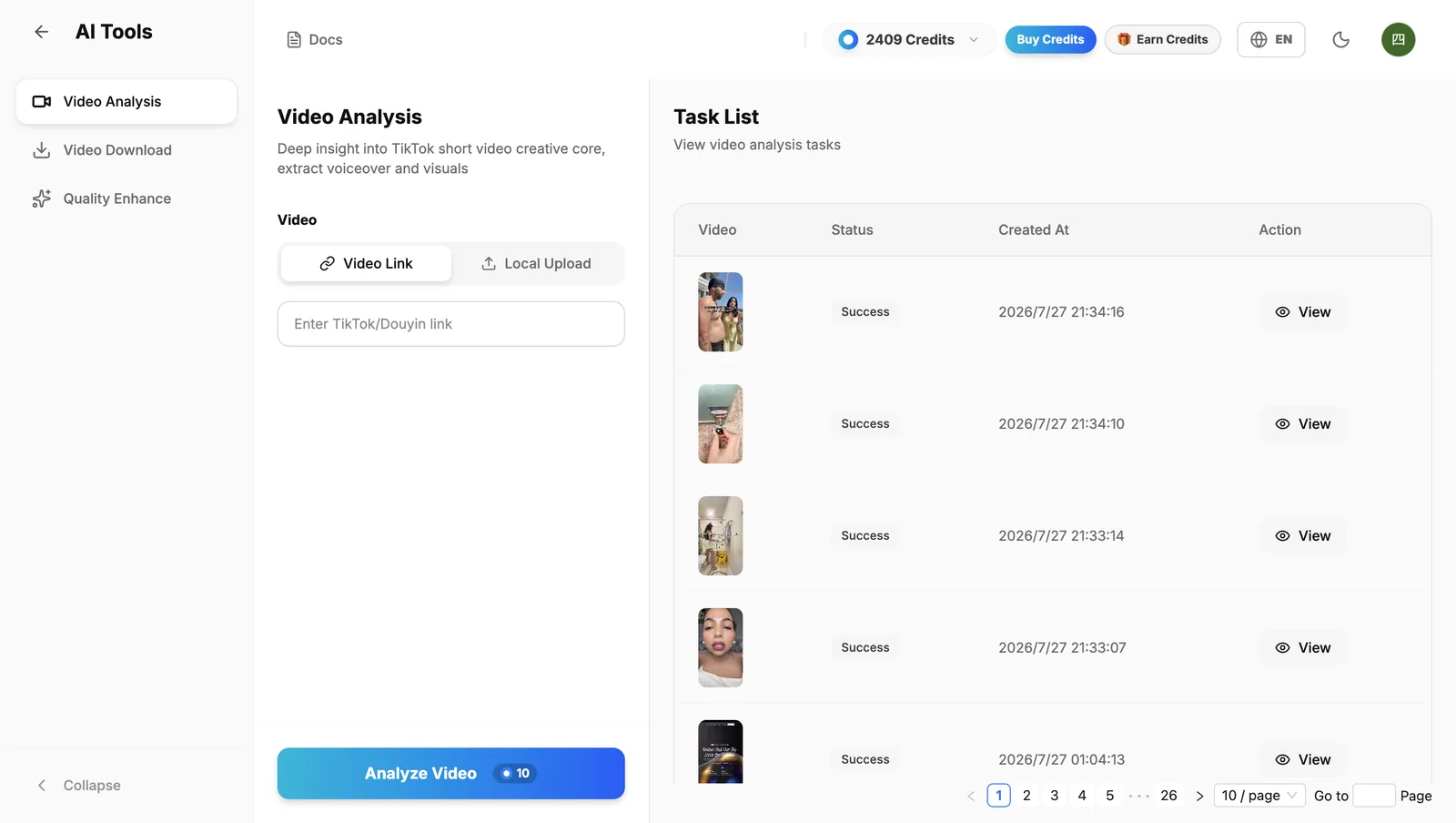
Open Video Analysis, pick Video Link and paste the TikTok/Douyin link you want to break down, or switch to Local Upload for an MP4 file (up to 10MB each). Both give the same result — study a competitor's winner or review footage you already shot.
2Click Analyze and let it break the video down
Hit Analyze Video. Clipcat splits the clip into shots along the timeline, reads the camera, blocking, composition and expression of each one, and transcribes the original voiceover line by line. The task appears in the list on the right and shows Success when it's done.
3View and copy the full script
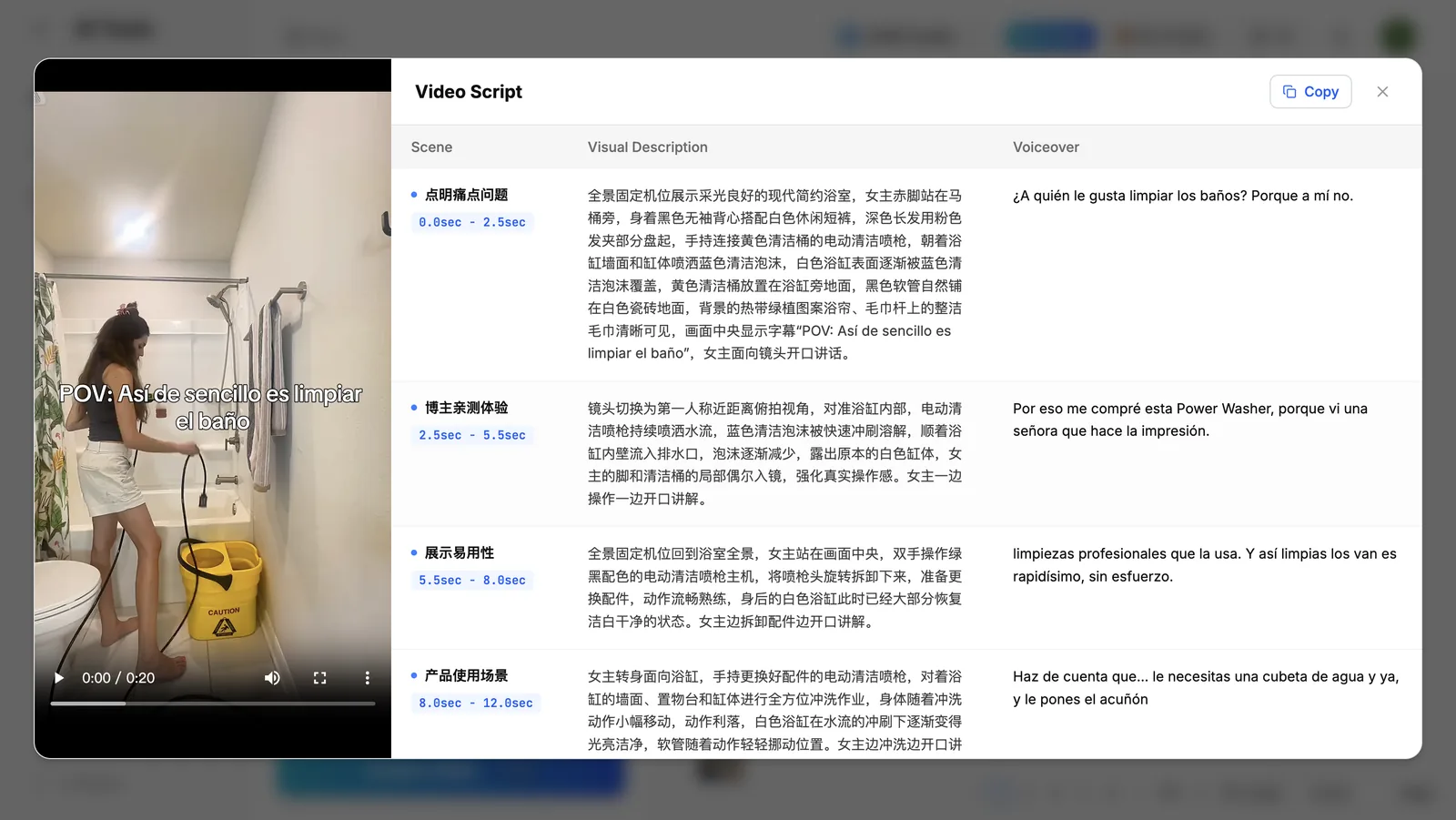
Click View on the task to see the video preview on the left and the full script on the right: one row per shot, with three aligned columns — scene + time range, visual description, and voiceover. Hit Copy in the top corner to take the whole script and start rewriting.
How to read the breakdown
Don't just copy the script — read it from these angles and you'll see why the video worked:
- Opening hook: look at the first shot's visuals and voiceover. Winners almost always land a pain point, a tease or a contrast in the first 3 seconds — that's the part to replicate first.
- Pacing & timing: check the time range on each shot. Tighter cuts mean faster pacing; note when it transitions and when the selling point drops, then map that onto your own script.
- Visual design: the camera, blocking, composition, props and expression in the visual notes are your on-set reference — you can build the scene without ever pausing frame by frame.
- Script logic: the voiceover lines up with each shot, so you can see how it moves from pain point to selling point to call to action — then swap in your own product.
Once it clicks, widen the net: use collect viral videos to pull winners in your niche by keyword, then run each one through Video Analysis to build your own library of proven storyboards. When you're ready to ship a finished cut, viral video cloning replicates that structure in one click.
FAQ
How long does it take to break down a viral shopping video?
With Clipcat Video Analysis, paste a TikTok/Douyin link or upload a video and you get a shot-by-shot storyboard with visual notes and voiceover in seconds — no frame-by-frame pausing or manual transcription.
What does Video Analysis output?
A complete video script broken down shot by shot. Each shot includes the shot type, time range, a visual description (framing, blocking, composition, expression) and the matching voiceover, so visuals and lines line up one to one.
Is the voiceover a transcription or a translation?
The voiceover is transcribed line by line from the video's original audio and aligned to each shot, so you can study the pacing of the lines and the opening hook, then rewrite them for your own product.
Is it OK to break down someone else's video?
Video Analysis is for research and learning: it helps you understand a winner's shot structure and script hooks so you can rewrite them into your own script — not to re-upload the original footage. Always publish with visuals and copy you shot or generated yourself.
What inputs and file sizes are supported?
Two ways: paste a TikTok/Douyin video link, or upload an MP4 file (up to 10MB each). Both give the same result. For larger videos, use the link option.