GUIDE · TIKTOK AI VIDEO CREATION
How to Make TikTok AI Videos with Clipcat: Research, Script, and Create
A useful AI-video workflow does not start at generation. Clipcat’s public tools can connect research, video analysis, structured prompting, and video creation so each new version has a clear reason to exist.
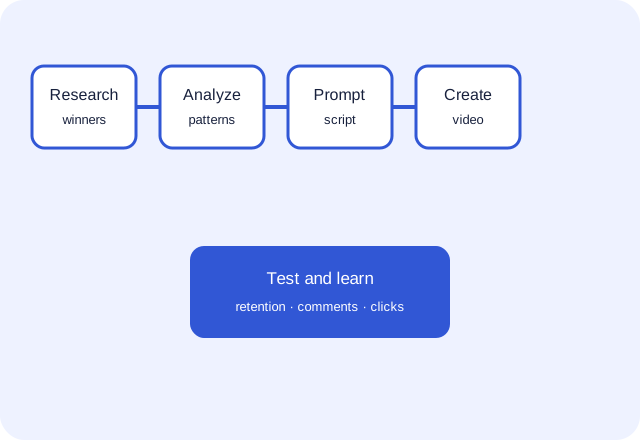
What can Clipcat do in a TikTok video workflow?
Clipcat can bring public-content research, video-structure analysis, prompt preparation, and AI video creation into one workflow. It does not guarantee views, sales, or ad performance. It helps creators make the work explicit, create comparable versions, and iterate using real publishing results.
The typical problem is not the lack of a generation button. It is unresolved work before generation: no clear sample set, no explanation of what the opening is solving, and no brief that aligns product facts with pacing. The result may look polished while showing the product too late, making unsupported claims, or ending without a clear next step.
Treat AI video as a content experiment. Build a reference set, extract mechanisms, and create a small number of versions with deliberately different variables. That makes the next improvement actionable.
The five-step Clipcat workflow for TikTok AI videos
1. Collect public samples relevant to the product
Set boundaries first: platform, market, language, category, audience, and time range. “English-speaking market, last 60 days, kitchen organization, small-home audience” is more useful than a random pile of links. Use collect viral videos to organize a public reference set.
2. Turn “this looks good” into fields
Record the opening promise, when the product appears, how a claim is demonstrated, what the ending asks the viewer to do, and the rhythm of shots and captions. Video analysis should help you discuss shots, visuals, and voiceover logic, not duplicate a source video.
3. Put product facts and audience constraints into the prompt
A prompt is a working brief, not “make a viral video.” Specify the product, verified facts, audience, objections, duration, format, and prohibited claims. Detail reduces guesswork; it is not filler.
4. Generate comparable versions for one goal
Start with three: a problem-first hook, an outcome-first hook, and a direct product demonstration. Keep product facts, duration, aspect ratio, and tone similar. Clear variation is what makes later feedback useful.
5. Review results and return to the script
Track early retention, completion, comment themes, clicks, and any conversion signal you can reliably access. A weak result can come from the opening, audience, material credibility, or product fit. Write the learning back into the prompt and change only one or two variables next time.
Researching viral videos is not copying viral videos
Public high-performing videos can reveal where an audience pays attention. They do not give permission to reuse a source’s wording, footage, music, people, product photography, or brand assets. The useful research unit is a mechanism, not a finished asset.
- Study: how a problem is introduced, when proof appears, whether shots and narration align, and whether the CTA is clear.
- Do not reuse: source footage, distinctive copy, music, faces, reviews, trademarks, or unverified product conclusions.
- Verify again: your own specification, price, promotion conditions, delivery terms, certification, and suitability.
That is why unverified “success stories” do not belong in a working brief. They create false promises instead of useful decisions.
A reusable TikTok product-video prompt template
Use research to build an original brief. Fill the brackets with facts you can support.
The key fields are verified facts and output structure. With the same prompt, a teammate knows what material to prepare, what to review, and which variable is being tested.
How Clipcat tools connect across the workflow
Sample: collect viral videos to create a public reference set by keyword and market.
Analyze: video analysis to organize shots, visuals, and voiceover logic.
Draft: viral product prompt generator to turn product facts, audience, and creative direction into a structured prompt.
Reverse: video to prompt to create a discussable structure from an existing video, while respecting rights and avoiding imitation.
Create: TikTok video generator to turn a verified script and assets into a video draft for testing.
Traceability is the point: every version can point back to its samples, creative choice, and prompt constraints. Regardless of performance, the next edit has a place to start.
Six checks before you publish an AI product video
- Product consistency: Do color, appearance, quantity, and packaging match the real product?
- Evidence: Does every feature or effect have support in product facts or the visual demonstration?
- Claims: Have you removed absolute promises, invented reviews, and unsupported rankings or outcomes?
- Rights: Do you have permission for people, music, images, trademarks, and user content?
- Mobile readability: Are captions clear, unobstructed, and is the product plus scenario clear from the first screen?
- Test record: What variable did this version test, and how will the next version reproduce or improve it?
FAQ
What is Clipcat?
Clipcat is an AI video creation platform for TikTok creators and sellers. This guide covers its public tools for research, video analysis, prompting, and video creation.
Can Clipcat replace product research or content strategy?
No. It can speed up a creation workflow, but product facts, audience decisions, rights review, and final publishing decisions remain the creator’s responsibility.
Why can AI video feel inauthentic?
The brief may not define the scene, actions, factual boundaries, or shot rhythm, or the source material may lack credible detail. Improve the brief before adding more adjectives, then test a small comparable batch.
How many versions should one prompt produce?
Three is a sensible start. Change only the opening, narrative order, or CTA while keeping other conditions close, so feedback can be interpreted.
Treat prompts as content assets, not one-off instructions
When research, product facts, scripts, and results are recorded together, efficiency comes from better decisions rather than bigger promises. Start with a structured prompt grounded in real information, then keep iterating from publishing results.
Open Clipcat’s viral product prompt generator