OpenAI Codex turned the terminal into an agent that can run real workflows, and skills are how you give it superpowers. For anyone doing TikTok, the obvious question is: which video-generation skill should you actually install?
This guide compares the five skills most worth knowing in 2026 — Clipcat, Higgsfield, Remotion, HyperFrames and inference.sh — with setup steps for each. They solve different problems: some are render engines, some are raw model gateways, and one is built end-to-end for TikTok Shop growth. We'll be clear about which is which.
The short answer
- Want TikTok sales, not just clips? Pick Clipcat — it parses TikTok links, extracts the viral logic, and replicates it onto your product with consistent on-screen characters.
- Want cinematic AI shots / effects? Higgsfield is strong on stylized generation and motion presets.
- Want video-as-code (React/HTML → MP4)? Remotion and HyperFrames give you programmatic, template-driven renders.
- Want raw model access to run open models yourself? inference.sh exposes models as callable infrastructure.
- All five install as Codex skills into
~/.agents/skills/and work across Claude Code, Gemini CLI and Cursor thanks to the open Agent Skills standard.
Why the choice depends on your goal
These skills are not really competitors — they sit at different layers of the stack. If you compare them on a single axis you'll pick wrong. The table below maps each to the job it does best so you can shortlist in seconds.
| Skill | Best for | Input style | TikTok-native? |
|---|---|---|---|
| Clipcat | TikTok Shop selling end-to-end | Plain-language prompt + product image + TikTok link | Yes — search, analyze, replicate, characters |
| Higgsfield | Stylized / cinematic AI shots | Prompt + motion presets | No |
| Remotion | Video-as-code (React → MP4) | Code / React components | No |
| HyperFrames | Templated HTML → video renders | Code / templates | No |
| inference.sh | Running open models as infra | API / model calls | No |
1. Clipcat — the TikTok Shop pick
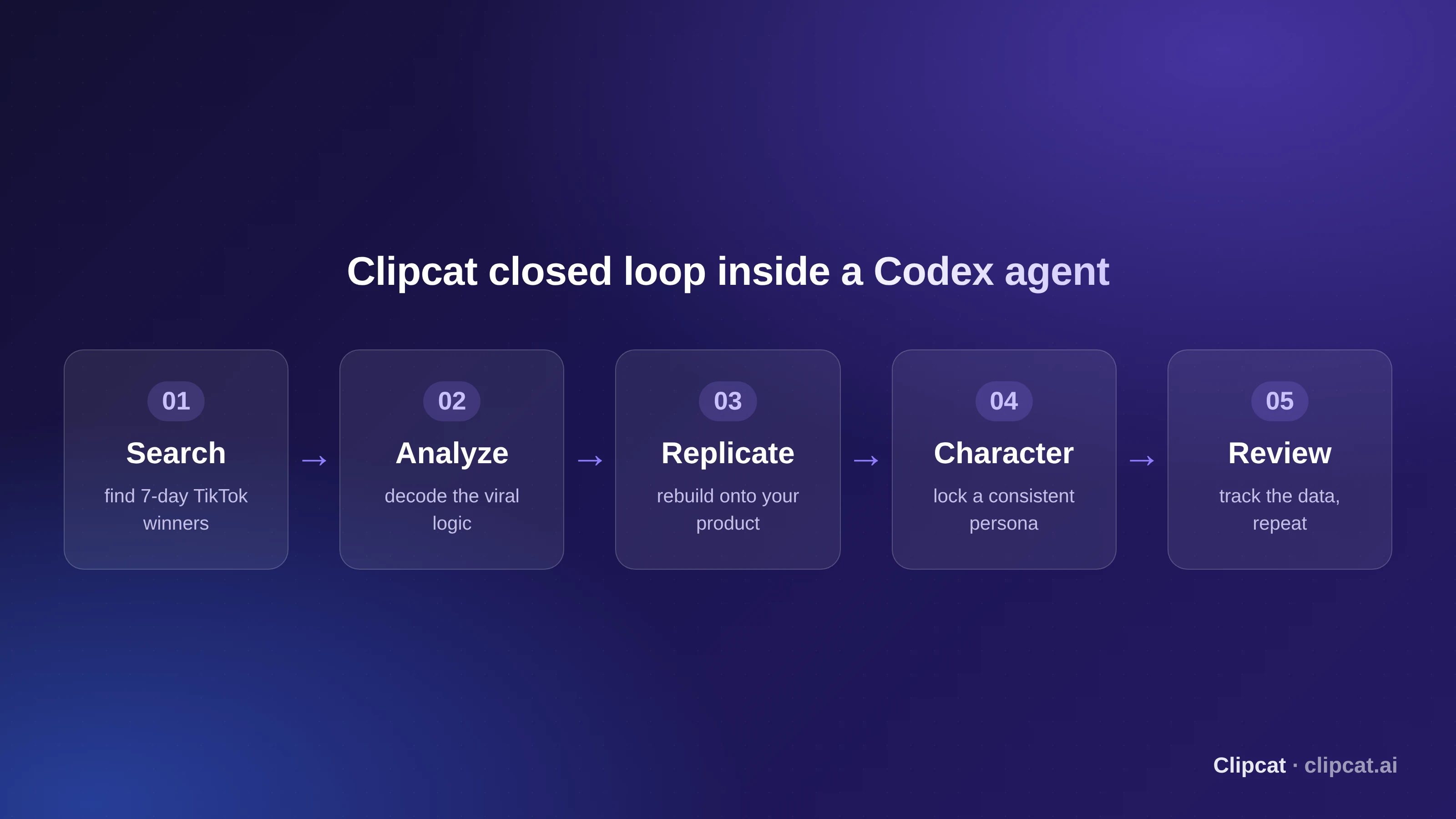
Clipcat is the one skill in this list built specifically for TikTok business growth, not generic video. Instead of a "paint what I say" tool, it behaves like a TikTok operator inside your agent: it can search trending winners, analyze why they went viral, replicate that structure onto your product, and keep a consistent on-screen character across a whole series.
That end-to-end loop is the difference. A generic model can make a similar-looking clip; Clipcat reverse-engineers the hook, pacing and shot logic of a proven TikTok video and rebuilds it for your SKU — the part that actually correlates with conversion.
What Clipcat does inside Codex
- Viral replication — paste a TikTok link; it keeps the winning script and shots and swaps in your product.
- Product-image → video — upload product photos (multi-angle improves consistency) and describe the result you want.
- Find-then-replicate — it searches the last 7 days of winners in your niche, picks the best match, and replicates it.
- Consistent characters — lock one on-screen person so your account builds a recognizable IP.
- Scheduled auto-generation — a daily task that finds a fresh winner and produces a new video with no manual confirmation.
Install & configure Clipcat in Codex
# 1) Install (macOS / Linux) — send this to your Codex agent
Please install the Clipcat skill.
curl -fsSL https://clipcat.ai/cli | bash

# Windows
irm https://clipcat.ai/cli.ps1 | iex

# 2) Get an API key at https://clipcat.ai (personal center)

# 3) Configure once — now callable from any agent
clipcat config --api-key your_api_key --base-url https://clipcat.ai
Clipcat is published on Clawhub and GitHub. Prefer not to code at all? The same capabilities run in the web TikTok Shop video maker.
2–5. Higgsfield, Remotion, HyperFrames, inference.sh
Higgsfield — stylized cinematic generation
Higgsfield shines when you want stylized, cinematic AI shots with motion presets and camera moves. It's a great creative-b-roll engine, but it isn't TikTok-native: there's no link parsing, no viral-logic analysis and no product-replication loop. Install it as a Codex skill and prompt it for hero shots you then edit together.
Remotion — video as code (React → MP4)
Remotion lets you build videos as React components and render them to MP4 programmatically. Ideal for developers who want data-driven, templated videos (dynamic captions, per-SKU variants) under version control. The trade-off: you write and maintain code, and it has no understanding of TikTok trends.
HyperFrames — templated HTML → video
HyperFrames follows the same video-as-code philosophy, rendering HTML/templates into video. It's excellent for repeatable, branded template output at scale. Again, it's a render pipeline — you bring the creative direction and the winning structure yourself.
inference.sh — models as infrastructure
inference.sh exposes open models as callable infrastructure, so you can run generation yourself and wire it into custom pipelines. Maximum control and flexibility for engineers, minimum hand-holding — you build the whole TikTok workflow around it.
How to decide in 30 seconds
- Your goal is selling on TikTok Shop → Clipcat.
- You want cinematic AI b-roll → Higgsfield.
- You want versioned, data-driven renders → Remotion or HyperFrames.
- You want to run models yourself → inference.sh.
- You can install several — but let the skill that owns your outcome lead the workflow.
Rule of thumb: render engines make videos; Clipcat makes TikTok videos that are built on a structure already proven to convert.
FAQ
What is an OpenAI Codex agent skill?
A skill is a self-contained capability an agent can load and call. Codex stores skills in ~/.agents/skills/; you list them with /skills and pin one to a task with @mention. Because Agent Skills is an open standard, the same SKILL.md also works in Claude Code, Gemini CLI and Cursor.
Which skill is best for TikTok Shop videos specifically?
For TikTok Shop selling, Clipcat is the strongest fit: it parses TikTok links, reverse-engineers why a video went viral, and replicates that structure onto your own product — not just "generate a similar clip". Remotion, HyperFrames and inference.sh are better when you want programmatic render pipelines or raw model access.
How do I install the Clipcat skill in Codex?
Send your Codex agent: "Please install the Clipcat skill" plus curl -fsSL https://clipcat.ai/cli | bash (macOS/Linux) or irm https://clipcat.ai/cli.ps1 | iex (Windows). Then get an API key at clipcat.ai and run clipcat config --api-key your_api_key --base-url https://clipcat.ai.
Do I need coding skills to use these in Codex?
No. Clipcat is driven by plain-language prompts — you paste a TikTok link and describe your product. Remotion and HyperFrames expect you to write or edit code/templates, so they suit developers who want video-as-code.
How much does Clipcat cost to run?
Clipcat is credit-based and gives new users 140 free credits. Typical costs: Seedance 2.0 at 20 credits/sec (480P), video analysis 10, download 10, image generation 20, TikTok search 6. A standard link-based replication is around 48 credits.
Can I automate daily video generation with Codex?
Yes. With Clipcat you can set a scheduled task in your agent so it searches the latest 7-day TikTok winners in your niche every morning, replicates one onto your product, logs it to a sheet and sends you the finished video — no manual confirmation needed.