Over the last year, "video-as-code" let developers produce video the way they write programs. But for TikTok sellers the real pain was never "render a clip" — it was finding winners, understanding why they won, replicating them, and shipping new ones every day, exactly the work top media buyers do daily and hate most.
The Clipcat skill packages that whole loop into your agent. Whether you run Claude Code, Codex or Workbuddy, installing this one skill turns them from "coding assistants" into TikTok shopping-video operators. No code required — you drive it in plain language.
The short answer
- One skill, many agents: the same Clipcat skill installs and runs in Claude Code, Codex, Workbuddy and OpenClaw.
- Prompt-driven: a TikTok link + product image + one instruction, and the agent searches, analyzes, replicates and generates end to end.
- Replicates the viral logic, not just similar visuals — the part that actually correlates with conversion.
- Consistent characters + scheduling: build account IP and auto-produce fresh assets daily.
From "video-as-code" to "selling-as-a-prompt"
Video-as-code is about being reusable, versioned and batchable — great for engineering teams, but it stops at "render". You still have to invent the hook, find the structure, and guess what will go viral.
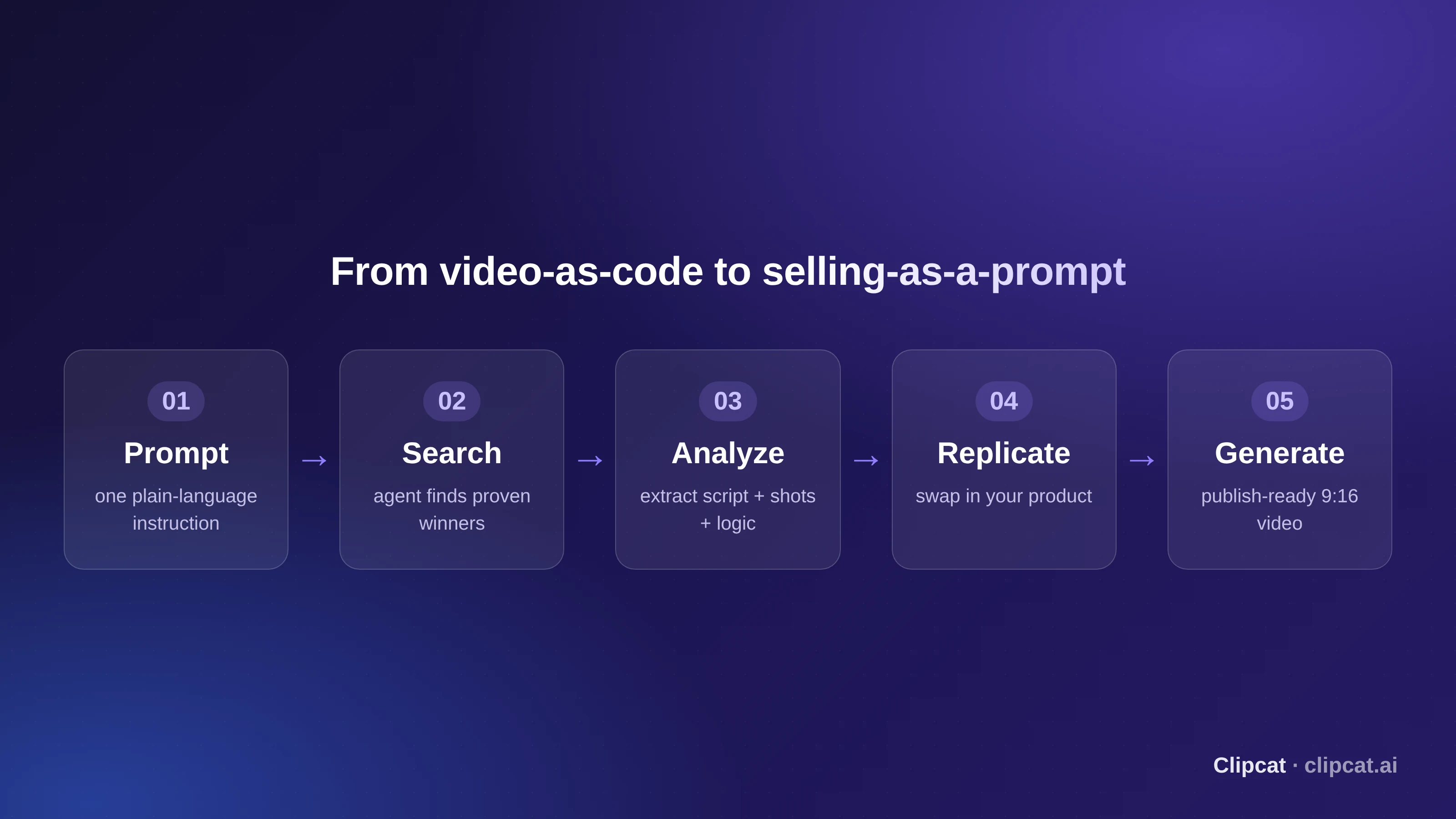
Clipcat raises the abstraction one level: instead of describing frames in code, your agent understands why a TikTok went viral and replicates it. What you write is no longer a render template — it's a business instruction: "replicate this winner onto my product".
Two steps to your agent's first shopping video
Install and configure the Clipcat skill
Send the install command to your agent and it installs automatically; configure the API key once and any agent can call it. You never hand-edit config files.
# Install (macOS / Linux) — send to Claude Code / Codex / Workbuddy
Please install the Clipcat skill.
curl -fsSL https://clipcat.ai/cli | bash

# Windows
irm https://clipcat.ai/cli.ps1 | iex

# Configure once
clipcat config --api-key your_api_key --base-url https://clipcat.aiDrive it with one plain-language prompt
Upload product images, hand the agent a proven TikTok link and your requirement. It parses the original script and shots, keeps the winning structure, swaps in your product, and produces a publish-ready 9:16 video. Want a person on screen? Specify a fixed character. Want to batch-test? Fire several hooks in a row.
Viral replication · example prompt
Use the Clipcat skill's replication feature to fully replicate the original video's script and shots, only swapping the product for mine (adjust any voiceover to my product; if none, no voiceover needed), no subtitles, keep the new script within 15 seconds, use the seedance2.0 model, voiceover in English. Here is the TikTok link to replicate: {URL}
Why agent + Clipcat out-produces generic tools
Wiring an agent to a generic model versus wiring it to Clipcat gives you two different species. The table shows where the gap is:
| Dimension | Generic video skill | Clipcat skill |
|---|---|---|
| Role | An artist that paints on command | An operator = ops + marketing + media buyer |
| Link parsing | Can't parse TikTok links | Paste a link → extract script + shots + viral logic |
| Replication | Only similar visuals | One-click replicate viral logic onto your product |
| Character consistency | New face every time | Lock an on-screen person to build lasting IP |
| Automation | Manual, one by one | Scheduled tasks produce daily |
5 ready-to-copy selling playbooks (with real videos)
These 5 playbooks cover Clipcat's full search → analyze → replicate → character → automate loop. Each ships with a copy-paste prompt template and the actual generated video — copy them and you're running.
About the {} in each prompt template: anything wrapped in curly braces (e.g. {URL}, {product images}, {US}, {15 seconds}, {seedance2.0}) is a replaceable variable — swap the braces and their sample together for your own link, product, target market, duration and model. Don't keep the braces themselves.
Playbook 1 · Viral replication: drop a TikTok link, get a new video
See a great video? Hand the TikTok link to your agent. It deconstructs the winner's script and shot logic, keeps that framework, swaps in your product, and outputs a publish-ready, high-converting video. Copy the link from the desktop web (so it carries a video id); up to 9 product images, 10M total.
Viral replication · prompt template
Use the Clipcat skill's replication feature to fully replicate the original video's script and shots, only swapping the product for mine (adjust any voiceover to my product; if none, no voiceover), no subtitles, keep the new script within 15 seconds, model seedance2.0, voiceover in English. TikTok link to replicate: {URL}
Playbook 2 · Product image → video: build a local-market winner
Upload product images plus one requirement and the agent matches native voiceover and scenes to generate a hyper-real shopping clip. Multi-angle images keep the product consistent (the system auto-builds a white-background grid for the model); the requirement matters most — describe the exact result. Want a person on screen? Specify a fixed recurring character.
Product image → video · prompt template
Use the clipcat skill with this product {product images} to generate a {prompt, e.g. UK girl OOTD outfit video}, 15 seconds, model seedance2.0, voiceover in English.
Playbook 3 · AI finds a TikTok winner, then replicates it
The most popular playbook among sellers — it chains "search winners → pick the best → analyze structure → replicate" into one pipeline. Let the agent find the last-7-day winners in your niche and target market, grab the best-matching TikTok link, and replicate it onto your product. Versus manual "search → decode → shoot/generate", it saves 3–5 hours a day.
AI find-then-replicate · prompt template
Use the clipcat Skill to find the hottest {product category} shopping videos on {US} TikTok in the last 7 days, then — my product is in the image — find the single best-matching winner for my category and get its tk link. Then use Clipcat's replication to fully replicate the script and shots, only swapping in my product (adjust/omit voiceover accordingly), no subtitles, within 15s, model seedance2.0, voiceover in English.
Playbook 4 · Fixed on-screen character: build account IP
Generate or upload one photo to create a near-real digital human that recurs across all your videos — no filming, no real talent. The persona keeps a consistent look and style across the series, helping the account build a distinct identity. Just provide a generated character id (from "My Characters") or an accessible character image link.
Fixed character · prompt template
My on-screen character is {character id}, and {product images} are my product. Use the clipcat skill to fully replicate the original video's script and shots, only swapping in my product (adjust/omit voiceover accordingly), no subtitles; if the original has an on-screen person, the new one should too. Keep within 15s, model seedance2.0 mini, voiceover in English. TikTok link to replicate: {tk link}
Playbook 5 · Daily perpetual machine: schedule find-and-generate
Set one scheduled task and the agent finds fresh, non-repeating TikTok winners for your product every day and produces same-style videos — new assets waiting each morning, logged to one sheet for review. No confirmation needed, and you can keep iterating with the agent — a true "AI asset perpetual machine".
Daily perpetual machine · prompt template
Set a scheduled task: every day at 9am use the clipcat Skill to find the hottest {product category} shopping videos on {US} TikTok in the last 7 days (never repeating previously used references). My product is in the image — each time find the best-matching winner, get its tk link, fully replicate with Clipcat (swap in my product only, no subtitles, within 15s, model seedance2.0 mini, voiceover English). Don't ask me to confirm — generate directly; log every replicated video to the same sheet and send me the new video plus the full sheet each time.
FAQ
Which agents does the Clipcat skill support?
Clipcat targets Codex, Claude Code, Workbuddy and OpenClaw. Because Agent Skills is an open standard, one skill definition works across agents: Codex installs it to ~/.agents/skills/, Claude Code to ~/.claude/skills/.
Can I use it without coding?
Yes. Clipcat is entirely prompt-driven. Hand the agent a TikTok link and a product image, describe the result in one sentence, and it calls the skill to search, analyze, replicate and generate.
How is this different from calling a video model directly?
A raw model only makes a "similar-looking" clip. Clipcat first parses a proven TikTok video's script, shots and viral logic, then rebuilds that structure onto your product — and can lock a consistent character — so you're building on a structure already proven to convert.
How do I install Clipcat in my agent?
Send the agent "Please install the Clipcat skill" with curl -fsSL https://clipcat.ai/cli | bash (macOS/Linux) or irm https://clipcat.ai/cli.ps1 | iex (Windows), then get an API key at clipcat.ai and run clipcat config --api-key your_api_key --base-url https://clipcat.ai.
Can the agent produce shopping videos automatically every day?
Yes. Set a scheduled task so the agent searches your niche's last-7-day TikTok winners each morning (without repeating past ones), replicates one onto your product, logs it to one sheet and sends you the finished video — no confirmation needed.
How many credits does one video cost?
Free users can run trial generations on the base models first. A video's exact credit cost varies dynamically by model, length and resolution — just ask your agent (e.g. "how many credits will this take?") and it returns the current cost, so you never have to track numbers yourself.