GUIDE·Seller's buying guide
The best AI tool for TikTok Shop videos — a seller’s guide
On TikTok Shop, the videos that sell feel native, hook you in the first three seconds, and make you want to buy right away. This guide walks through how to pick a genuinely useful AI tool for TikTok Shop videos — the four-step Clipcat workflow, the seller use cases it covers, and an honest side-by-side of five leading options.
Reverse-engineered from winners
Clipcat has a library of 7,000+ AI shoppable videos that actually sold, each with its prompt reverse-engineered — you copy hooks proven with real dollars.
15 countries, 30 categories
Daily for the US, weekly elsewhere. Filter by country / video type / top category / hook to lock onto how your target market wins.
One-click remix, Agent-ready
Turn any winner into your own product video in one click, upscale to 1080P / 2K, and let your Agent run the whole chain.
Get clear on what the clip should do
Before you make anything, set the goal, pick the angle, and gather assets — this decides the quality of everything that follows.
1Goal & assets
Nail the core promise in one sentence.
Decide what the video should accomplish: awareness, clicks, or a purchase. Then pick an angle — problem-and-solution, before-and-after, unboxing, or comparison. Pull your assets together: product photos, benefits, real reviews, any UGC you can reuse. Finally write the core promise in one line (e.g. “removes stains in 10 seconds”) — it drives the script, pacing and on-screen text all at once.
- Set the goal: awareness / clicks / purchase
- Pick the angle: problem-solution / before-after / unboxing / comparison
- Gather assets: product shots, benefits, reviews, reusable UGC
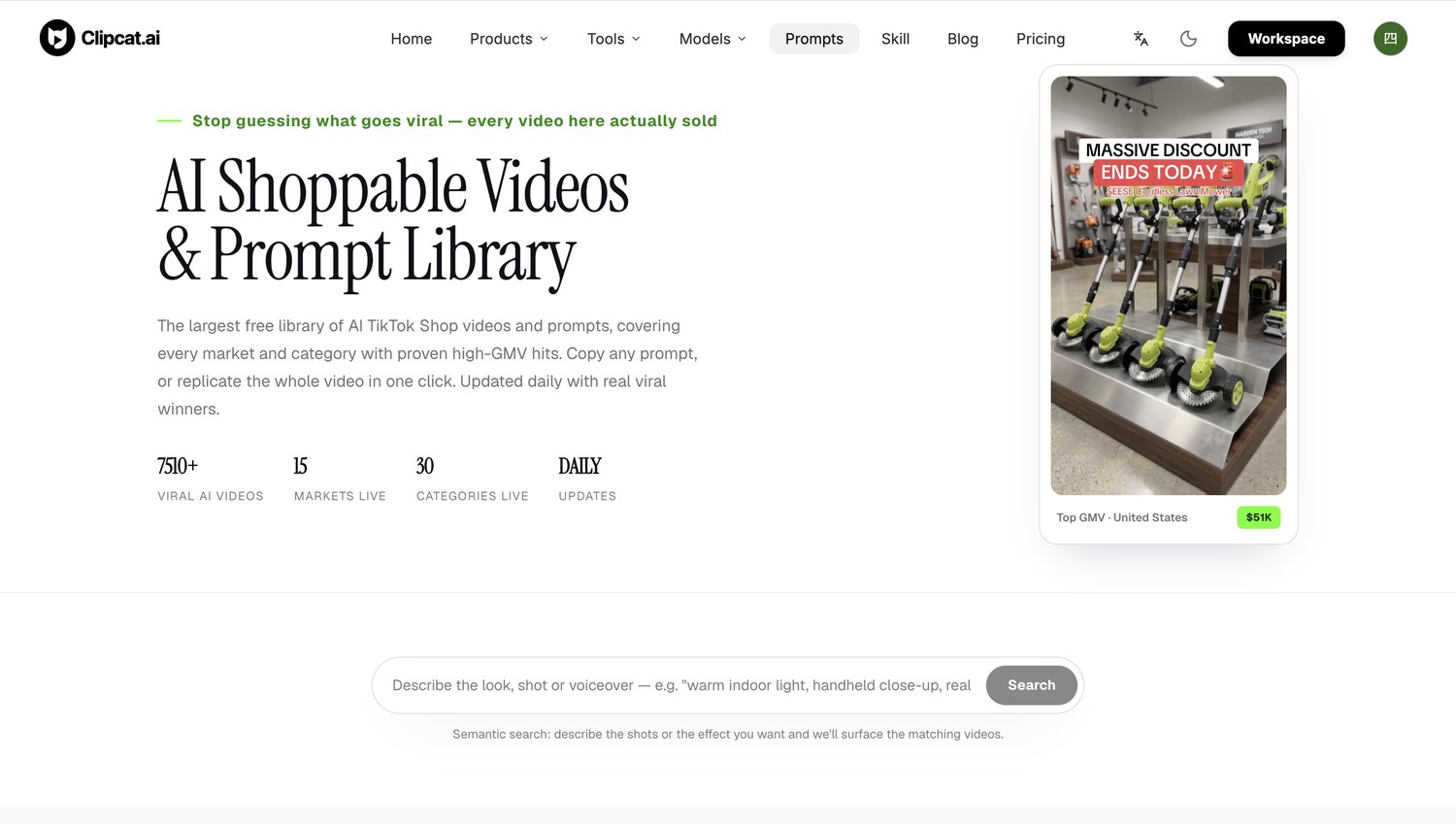
Find the closest winner in the library
Enter a country category page and filter by video type, top category and hook to find the winner closest to your product — no need to invent an idea.
2Find a reference
Pick the market, then filter by hook.
Take the US category page: you can look at AI shoppable videos for the US market only and filter them by video type, top-level category and hook to find the closest reference fast. Every entry lays out its prompt, GMV, views, opening hook, on-screen talent, voiceover and duration — so why it worked and how to remix it is obvious. Every other country works the same way.
- Enter by country, see only your target market's winners
- Filter by video type / top-level category / hook
- Each entry carries prompt, GMV, hook and more structured fields
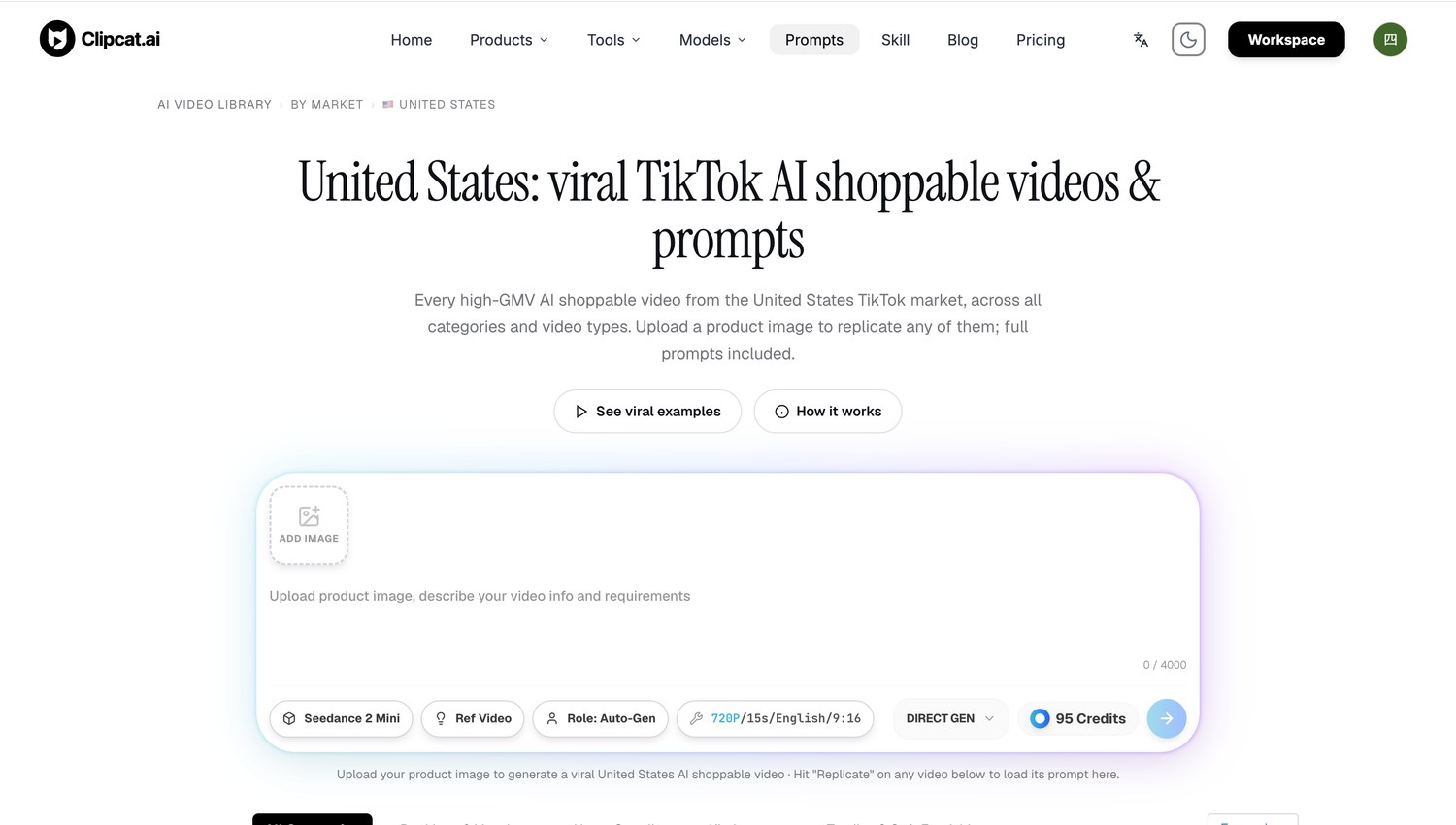
Rewrite the prompt into your own
Open a video detail page, view and copy the full prompt, keep what makes it sell, and swap in your own product and benefits.
3Rewrite the prompt
Keep the hook, swap the product.
Open any winner into its video detail page and you can fully view and copy its prompt. Keep what made it sell — the opening hook, shot order, camera language, voiceover tone, promo mechanic and closing CTA; swap only the product, benefits, on-screen text and market-specific language and currency. Don't carry over the original's ratings, sales or efficacy claims — those belong to someone else's product.
- View and copy the full prompt, broken down field by field
- Keep the winning hook / shot order / camera / voiceover
- Swap only product and benefits; drop claims you can't back
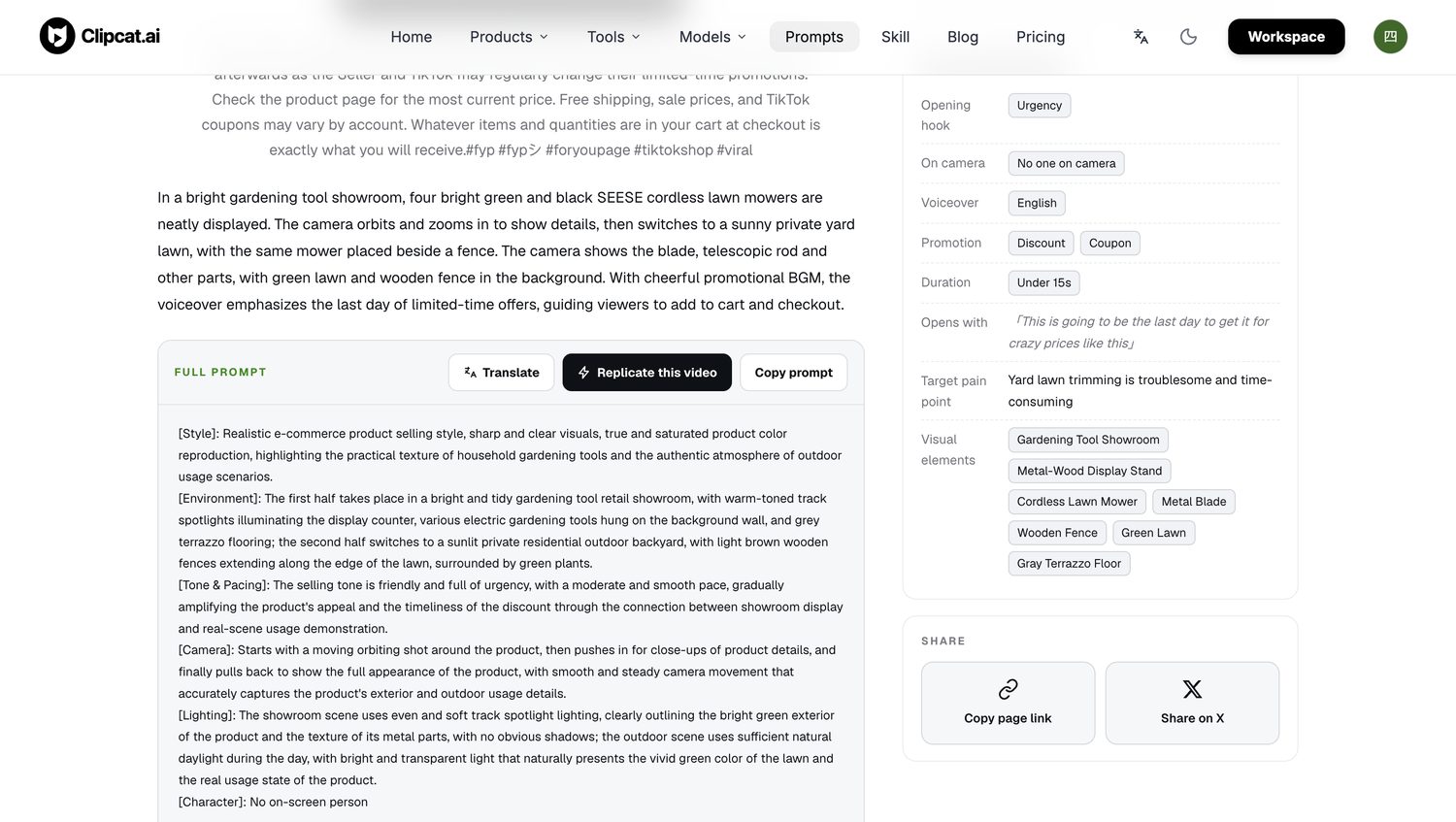
Generate, upscale, export
Generate straight from product photos, or one-click remix using the original's motion, then upscale to 1080P / 2K and export 9:16.
4Render & export
From prompt to finished cut, in one flow.
Product photos only? Use product-to-video to generate from your rewritten prompt. Want the original's motion and cuts too? Use one-click remix with the winner as reference and your product images on top. Then upscale to 1080P / 2K and export 9:16 straight for your storefront. Managing multiple SKUs? Reuse the same flow, swap assets, and ship variants fast.
- Product-to-video or one-click remix — two ways to generate
- Upscale to 1080P / 2K, export vertical 9:16
- Reuse the flow across SKUs to batch out variants
The TikTok Shop situations it covers
Clipcat covers the shoppable-video situations sellers deal with all the time:
- UGC-style product demos that fit impulse buys
- Before-and-after clips that show the result fast
- Testimonial edits that build trust without feeling overproduced
- Unboxing videos for launches and seasonal drops
- Catalog variants tailored by language and pricing
What's actually inside the library
This isn't a gallery of AI-generated samples — it's real shoppable videos that sold, laid bare. Every entry is broken down so you can see exactly why it worked and how to remix it: All fields come straight from the AI shoppable video prompt library.
5 AI tools for TikTok Shop videos , side by side
They all make videos, but the focus differs. This table helps you place each one fast:
| Tool | Best for | TikTok Shop selling | Key difference |
|---|---|---|---|
| ClipcatTop | Remixing real winners into your own | Purpose-built | 7,000+ real winners + reverse prompts + one-click remix, Agent-ready |
| CapCut | Final polish after the cut | Good finisher | Rich templates and effects for transitions, captions and last-mile polish |
| Canva | Static brand assets | Indirect | Great for covers, stickers, end cards; doesn't tell the video story |
| InVideo | Text-to-video drafts | Okay | Fast drafts when the script is ready; not built around shoppable workflows |
| VEED | Browser captions & cleanup | Okay | Lightweight online editing, subtitles and noise reduction for finishing |
A closer look at all five
ClipcatPurpose-built · Recommended
Clipcat is built for ecommerce selling. Its core isn't “yet another AI video generator” — it's the largest free AI shoppable video and prompt library: 7,000+ videos that actually sold, across 15 countries and 30 top-level categories, each reverse-engineered into a ready-to-use prompt. You find the closest reference to your product, rewrite its prompt, then generate with product-to-video or one-click remix, and upscale to 9:16. Your Agent can drive the whole chain automatically.
Best for: TikTok Shop sellers who want to reverse-engineer proven winners into on-point shoppable videos fast.
CapCutFinal polish
CapCut is the editor a lot of sellers already know — strong templates, effects and mobile-first editing for adding trend-driven transitions and tightening captions on UGC. If Clipcat takes you from a reference winner to a finished cut, CapCut is often where you add the final shine.
Best for: adding effects and transitions to a clip you already have.
CanvaStatic brand assets
Canva is handy for fast brand assets and simple layouts: cover frames, stickers and end cards that keep a shop looking consistent. Many sellers use Canva for the static design work, then lean on Clipcat to build the actual video story.
Best for: batching out covers, end cards and other static visuals.
InVideoText-to-video
InVideo is a solid text-to-video option with social templates and built-in voiceovers — handy when your script is ready and you just want a quick draft. For TikTok Shop specifically, it isn't built around shoppable winners and product workflows the way Clipcat is.
Best for: turning a ready script into a quick video draft.
VEEDCaptions & finishing
VEED keeps it lightweight: browser-based editing, subtitles, noise reduction and basic cleanup for quick finishing. Think of it as a caption-polish finisher, while the heavier “winner to finished cut” work goes to Clipcat.
Best for: online subtitles, noise reduction and quick finishing.
FAQ
What's the best AI tool for TikTok Shop videos for beginners?
For beginners, Clipcat is an easy place to start. You don't invent an idea from scratch — find the closest reference in the 7,000+ real-winner library by country and category, copy its broken-down prompt, swap in your product, then one-click remix into a 9:16 cut. No advanced editing chops needed.
Can I use an AI product video generator for TikTok Shop listings?
Yes. Clipcat can generate a shoppable video straight from product photos: find a reference winner, rewrite the prompt, pick a voiceover language, and export a 9:16 cut. Spin up color or bundle variants from the same flow, then use them on your storefront, in shoppable posts, or in ads.
How does a TikTok Shop video maker help increase conversions?
When a video moves at the right pace, shows the product early and gives believable proof, people keep watching and click through. Clipcat's library is made of winners proven with real GMV, so you can quickly test hooks, captions and scene order, then reuse the angles that work across products, languages and creators.
Is Clipcat a free AI tool for ecommerce videos?
The largest free AI shoppable video and prompt library is open to everyone — 7,000+ real winners, 15 countries and 30 top-level categories, no credit card to start. As your workflow grows, paid plans unlock higher-resolution generation, upscaling to 1080P / 2K, more models and more.
Make your own TikTok Shop videos from real winners
Open the largest free AI shoppable video and prompt library, find a reference, rewrite the prompt, and one-click remix — turning proven winners into your own cuts.